Best NFC watch 2026, picks and comparison
Fans of contactless payments will find their Best NFC watch by first checking whether their bank card is compatible. The benefits are more limited if you prefer paying for purchases in cash.
Prices recorded at retailers are for guidance only: they may have changed since. The current price is the one shown by the retailer. No price is shown for models sold exclusively on Amazon. Amounts converted from reference prices in euros using a dated exchange rate.
How we picked these models
- 1 selected model because they have the feature “NFC” according to data published by manufacturers and retailers.
- View methodology →
- No brand pays to appear in this selection or to rank higher.
Why choose an NFC watch for everyday payments?
Why paying with an NFC watch can make life easier
Taking out a bank card is not always convenient when you are carrying bags or keeping your phone deep in a pocket. A watch for contactless payments can reduce this hassle during everyday shopping. The main benefit is having a payment method on your wrist, provided the service is set up and accepted.
At the bakery, during a lunch break or after a walk, this feature can save you from searching for your wallet. You still need to be able to bring your wrist close to the terminal and meet the authentication requirements of the service you use. The watch makes the process easier without removing banking payment rules.
This option is particularly useful for people who already wear a smartwatch regularly. It adds a practical feature to something already on their wrist. If you often take your watch off or forget to charge it, its usefulness as a payment method becomes more limited.
- For everyday shopping, it can reduce the need to handle your card or phone.
- For outings with less to carry, it can provide an additional payment method when conditions allow.
- For established routines, it fits in more easily if you wear a watch every day.
NFC does not guarantee support for bank payments
NFC is a short-range communication technology. Its presence in a specification sheet is therefore not enough to prove that a watch lets you pay for purchases. Wrist-based payments also rely on a compatible payment service, available under the conditions set by its provider.
This distinction avoids a common confusion between a technical capability and a feature actually available to you. An NFC listing does not guarantee that you can add your bank card or access the service in your circumstances. The supported uses must be explicitly documented.
When looking for the best NFC watch, start with what you want it to do. Do you want to pay for purchases with your usual card from your wrist? This practical capability matters more than the acronym alone. Detailed compatibility checks can then confirm whether the promised feature meets your needs.
The best NFC watch depends on your priority
If payment is your main reason for buying, its availability must be a deciding factor. A watch that appeals in other respects loses much of its value if it does not let you pay the way you want. Define your main need before comparing additional features.
If you mainly want a watch for notifications or physical activity, payment can remain an extra. A search for “Best smartwatch” then reflects a broader set of considerations. Similarly, a search for “Best GPS watch” reflects a different priority that NFC alone cannot meet.
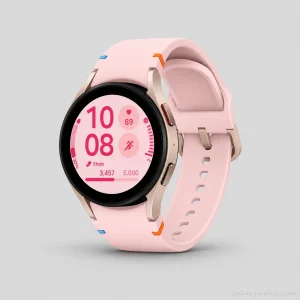
The selection on this page gives you an option to consider with the Samsung Galaxy Watch FE. Assess it according to your priority, then consult the buying guide to check the essential requirements before choosing. A model included in a selection still needs to suit your phone, your card and your habits.
How do you choose the best NFC watch for your habits?
The best watch with NFC is one that lets you pay with your card, works with your phone and fits your routine. Check these requirements before comparing secondary features. An NFC label alone does not confirm that you can pay from your wrist.
Check that your card is supported by the payment service
Start by identifying the payment service available on the watch. Then check its official list of supported banks and cards in your country. Your bank’s name alone does not always mean that your specific card is supported.
Check the card type covered and any restrictions with your bank. If compatibility remains unclear, ask for confirmation before buying. For a watch intended mainly for contactless payments, an incompatible card is a dealbreaker.
Check compatibility with your phone
Check your phone’s operating system and version, then compare them with the watch’s official requirements. Also identify the app needed to set it up and any restrictions affecting the features you want.
Do not assume compatibility based on the brand name alone. Being able to pair a phone and watch does not guarantee access to every feature. Check payment setup separately. If you plan to change phones, factor that future purchase into your decision to avoid having to replace your watch as well.
Choose battery life that suits your routine
Review the stated battery life and the conditions used to measure it. An estimate is only useful if the settings and features it covers match your needs. Also check the charging guidance and any accessories required.
Ask yourself a practical question: when will you be able to charge the watch regularly? If your routine leaves little time for charging, this criterion deserves more weight than features you will only use occasionally. A selection of “Best GPS watch” options serves a different priority; it cannot, on its own, help you choose a watch for everyday payments.
Choose a size you will wear regularly
Compare case dimensions, weight and strap sizes only where they are documented. Measure your wrist and check the manufacturer’s size guide. Also check how the strap can be adjusted and replaced.
For readability, review the available display information and adjustment options. The right size depends on your build and preferences, not just how it looks in a photo. If you are unsure which size to choose, favour a retailer whose return policy allows you to exchange an unsuitable choice.
Set your budget based on the features you actually need
Rank your priorities before choosing a product tier. If you mainly want a watch with contactless payments, bank and phone compatibility should come before extra features. If payments are secondary, your decision can depend more on your other everyday needs.
- Entry level: first, make sure your essential needs are clearly met, without assuming payment is available.
- Mid-range: identify the additional features you will actually use.
- High-end: consider whether the documented differences justify your personal choice.
No range alone guarantees better bank compatibility. A selection of “Best smartwatch” options can broaden your thinking, but keep payment among your deal-breakers if it is your reason for buying.
| Criterion | What to look for | Common mistake |
|---|---|---|
| Payment | Your card explicitly supported by the service offered | Confusing NFC support with payment availability |
| Phone | A compatible operating system with access to the features you want | Relying solely on the brand |
| Battery life | A charging routine that fits your schedule | Comparing only the most favourable claims |
| Size | Dimensions and a strap that fit your wrist | Choosing solely from photos |
| Range | Additional features that are genuinely useful | Assuming a higher-end model offers better payment support |
How to assess the Samsung Galaxy Watch FE before choosing
The Samsung Galaxy Watch FE is an option to consider in this selection. Its inclusion does not, however, establish that it suits your card and phone. Without checking the decisive criteria, a firm recommendation would be premature.
Review the previous checklist and look for official confirmation of each point. Leave any unconfirmed feature unresolved: do not turn an assumption into a reason to buy. Choose this model only if the essential requirements for your needs are confirmed.
Mistakes to avoid
- Buying before checking your specific card.
- Assuming all features will be available with your phone.
- Overlooking charging when you plan to pay regularly with the watch.
- Choosing a higher-end range without identifying how it benefits you.
Key takeaways
Follow this order: bank card, phone, battery life, size, then secondary features. Rule out a model if an essential requirement remains incompatible or cannot be confirmed. This will help you make a decision based on your needs, rather than the NFC label alone.
What should you know before paying with your NFC watch?
How do you add a bank card to an NFC watch?
Add your card through the payment app designed for your watch, then complete the verification required by your bank. Before you start, check the specific compatibility of your card, the service and the country concerned. Setup may require configuration on your phone and enabling a lock on your watch. A card accepted on your phone is not necessarily accepted on your watch, even when both devices are from the same brand.
Can you pay with an NFC watch without an Internet connection at the time of purchase?
Some services allow you to pay without an Internet connection on your watch at the time of purchase, but this depends on how they work. Check the digital wallet's terms, including any limits before you need to reconnect. Do not confuse independent payment functionality with the independence of other features. The “Best smartwatch” and “Best GPS watch” categories address different needs; neither on its own guarantees payment without a phone.
What should you do if you lose the watch you use for payments?
Quickly suspend payments on your watch through the associated service, if that option is available, then contact your bank if necessary. The lock provides protection, but it does not replace this step. Also check your recent transactions and report any suspicious transaction immediately. Depending on the service, you may be able to remove saved cards or remotely erase the watch. Then check with your bank whether the card itself needs to be blocked.
What limit applies to contactless payments with a watch?
The limit depends on your card, your bank, the payment service and the merchant's acceptance conditions. The contactless limit for a physical card does not necessarily apply in the same way to a watch. The authentication used by the digital wallet may change the authorisation conditions. Check your bank's rules before a major purchase and keep another payment method available, as a terminal may decline a transaction that would be authorised elsewhere.
How do you get a refund after paying with a watch?
Ask the merchant for a refund, explaining that you paid with your watch. Depending on their procedure, they may ask you to present proof of purchase and your watch with the card used selected in the digital wallet. The digital payment reference may differ from that of your physical card. If the last digits do not match, check the transaction details in the app. The time it takes to receive the refund then depends on the merchant and the financial institutions involved.
What should you do if a terminal declines payment from your watch?
Check that your watch is unlocked, the wallet is ready to pay and the correct card is selected. Then hold it near the terminal's contactless area, following the manufacturer's instructions. A declined payment does not necessarily mean NFC is faulty. A suspended card, declined bank authorisation or an incompatible terminal may also explain the failure. If the problem persists, use another payment method, then contact your bank or the service's support team.
Can you save several bank cards on an NFC watch?
Yes, provided the watch's digital wallet supports it and each card is compatible. Check the service's terms before relying on this option, as accepted cards and limits on the number of saved cards may vary. Set your default card to avoid charging the wrong account. Before making a payment with another card, select it in the wallet. NFC alone does not guarantee that you can add several cards or that they will be accepted.